Automatic Toolpath Generation for Woodworking: How AI CAM Works

Automatic Toolpath Generation for Woodworking: How AI CAM Works
You're a woodworker, not a CNC programmer. You bought a router to make better work faster—not to spend hours clicking through CAM software menus.
Traditional CAM requires 20+ manual decisions per toolpath. Select tool. Set feed rate. Choose depth per pass. Configure stepover. Add tabs. Set safe heights. Calculate ramp angles. Every. Single. Time.
Automatic toolpath generation changes this: Describe your cut in plain language, AI handles the technical details. This guide explains how it works and why it's transforming woodworking shops.
What is Automatic Toolpath Generation?
Traditional CAM workflow:
Design → Manual tool selection → Manual parameter entry → Manual optimization → Toolpath
(30+ clicks, 10-15 minutes)
Automatic CAM workflow:
Design → Natural language description → AI-generated toolpath
(One sentence, 30 seconds)
Example:
You say: "Profile cut this design out of 3/4-inch oak with 1/4-inch tabs"
AI generates:
- Tool: 1/4" upcut endmill
- Feed rate: 80 IPM (conservative for oak)
- Plunge rate: 20 IPM
- Depth per pass: 0.125" (4 passes for 0.5" material)
- Tabs: 4 total (corners), 0.25" tall
- Ramp angle: 3 degrees (protects bit)
- Cut direction: Climb milling (cleaner edges)
Result: Production-ready toolpath in under 30 seconds.
How AI Understands Woodworking
Traditional CAM doesn't know materials. You enter numbers—it doesn't care if they're safe or optimal.
AI CAM has material intelligence:
Material Database
AI knows hardness, density, and machinability:
- Hardwoods: Oak, maple, cherry (slow feeds, shallow passes)
- Softwoods: Pine, cedar, poplar (faster feeds, deeper passes)
- Sheet goods: MDF, plywood, melamine (watch for delamination)
- Plastics: Acrylic, HDPE, polycarbonate (avoid heat buildup)
Tool-Material Pairing
AI matches bits to materials:
- Hardwoods: Upcut spiral (chip evacuation)
- Plywood: Compression bit (prevents tear-out on top/bottom)
- Acrylic: Single-flute (prevents melting)
- MDF: Downcut (clean top edge)
Feed Rate Optimization
AI calculates chip load based on:
- Material hardness
- Bit diameter and flute count
- Spindle RPM (DeWalt, Makita, Bosch have different speeds)
- Machine rigidity (belt vs linear rail vs rack & pinion)
Traditional CAM: You guess. Hope it works. Adjust after failures. AI CAM: Optimal settings from the start.
Types of Automatic Toolpath Generation
1. Profile Cutting (Outside & Inside)
What you describe:"Cut out this shape with tabs to hold it in place"
AI decisions:
- Outside vs inside profile
- Tab placement (corners + long spans)
- Lead-in/lead-out angles (smooth entry, no witness marks)
- Cut direction (climb for finish, conventional for rough)
Manual CAM: 8-10 parameter fields AI CAM: One sentence
2. Pocket Clearing (Recesses & Trays)
What you describe:"Pocket this area 1/4-inch deep with smooth walls"
AI decisions:
- Roughing pass (large stepover, fast)
- Finishing pass (small stepover, clean walls)
- Island detection (preserve raised features)
- Stepdown strategy (multiple depths or single pass)
Example: Decorative Tray
Manual workflow:
- Select pocket operation
- Choose roughing tool (which size?)
- Set stepover (40%? 60%?)
- Set stepdown (how deep per pass?)
- Add finishing pass (separate operation)
- Choose finishing tool
- Set finishing stepover (10%? 20%?)
Time: 15 minutes
AI workflow:"Pocket clear this tray design, smooth finish for walnut"
Time: 20 seconds
3. V-Carving (Signs & Engraving)
What you describe:"V-carve this logo on pine"
AI decisions:
- Auto-trace bitmap images (converts to vectors)
- Calculate V-bit depth based on angle (30°, 60°, 90°)
- Variable depth for thick/thin lines
- Clearance passes for wide areas
- Finishing pass for crisp edges
Traditional V-carving requires:
- Manual image tracing (Inkscape, Illustrator)
- Depth calculations based on V-bit angle
- Test cuts to verify depth
- Adjustments after first attempt
AI V-carving:
- Upload image
- Select V-bit from library
- AI auto-traces and calculates depths
- First cut is correct
4. 3D Carving (Relief & Sculpture)
What you describe:"Carve this STL file, optimize for detail in hardwood"
AI decisions:
- Roughing strategy (adaptive clearing, 1/4" endmill)
- Finishing strategy (raster vs spiral, ball nose)
- Stepover based on desired scallop height
- Depth strategy (constant Z vs parallel finishing)
- Feed modulation (faster in open areas, slower in details)
Manual 3D CAM (Fusion 360):
- 20+ parameters for roughing pass
- 15+ parameters for finishing pass
- Simulation required to check for errors
- Trial and error for optimal settings
Total time: 45-60 minutes
AI 3D CAM:"Carve this at high detail for a wall plaque"
Total time: 3 minutes
5. Joinery (Dados, Dovetails, Finger Joints)
What you describe:"Create finger joints for a 12×8-inch drawer box, 1/2-inch material"
AI decisions:
- Joint spacing (based on material thickness)
- Joint depth (2/3 material thickness for strength)
- Corner logic (male/female alternation)
- Toolpath order (inside cuts first)
Traditional joinery CAM:
- Manually draw each finger
- Calculate spacing
- Create separate toolpaths for each wall
- Verify fit with test cuts
AI joinery CAM:
- Enter box dimensions
- AI generates all 4 walls with interlocking joints
- Guaranteed fit (no test cuts needed)
Real-World Time Savings
Example 1: Custom Cabinet Door
Traditional workflow:
- Draw door panel in CAD (30 min)
- Create profile toolpath for outside (10 min)
- Create pocket toolpaths for panel recess (15 min)
- Add decorative V-carve detail (20 min)
- Nest multiple doors on sheet (15 min)
- Generate G-code (5 min)
Total: 95 minutes
AI workflow:
- Enter dimensions: 24"H × 16"W, shaker style
- AI generates door with raised panel and mortises
- Add decorative V-carve: "Celtic knot in center"
- Auto-nest 6 doors on 4×8 sheet
- Export G-code
Total: 8 minutes
Time saved: 87 minutes = $60-120 at shop rates
Example 2: Sign Production (50 Units)
Traditional workflow:
- Import logo (5 min)
- Create V-carve toolpath (15 min)
- Add profile cut with tabs (10 min)
- Manually nest signs on sheet (20 min per sheet × 4 sheets)
- Generate G-code for each sheet (20 min)
Total: 130 minutes
AI workflow:
- Upload logo
- "V-carve 50 signs on 1/2-inch cedar, nest on sheets"
- AI auto-nests across 4 sheets
- Review and export
Total: 5 minutes
Time saved: 125 minutes = $100-200
How AI Learns Optimal Strategies
Machine Learning from CNC Experts
AI CAM is trained on thousands of successful toolpaths:
- Feed rates that prevent bit breakage
- Stepover percentages for different finish quality
- Depth strategies for various materials
- Chip evacuation patterns
You get the collective knowledge of expert machinists automatically.
Material-Specific Optimization
AI adapts to material behavior:
- Cherry: Prone to burn marks → reduced feed, higher RPM
- Plywood: Edge tear-out → compression bits, shallow last pass
- Acrylic: Heat-sensitive → single-flute bits, fast feed
- MDF: Abrasive → carbide tools, frequent bit changes
Machine Kinematics Awareness
AI understands different CNC router designs:
- Belt-driven (Shapeoko, X-Carve): Conservative acceleration
- Linear rail (Onefinity): Aggressive corner speeds
- Rack & pinion (industrial): Maximum performance
Your toolpaths are optimized for your specific machine.
What AI Automates (and What You Still Control)
AI Handles Automatically:
✅ Feed and speed calculations ✅ Depth per pass selection ✅ Tool selection from library ✅ Tab placement and sizing ✅ Ramp and lead-in angles ✅ Cut direction (climb vs conventional) ✅ Stepover percentages ✅ Safe Z-height clearances
You Still Control:
🎛️ Design intent (what you're making) 🎛️ Material choice 🎛️ Finish quality desired 🎛️ Tab locations (override AI suggestions) 🎛️ Tool overrides (force specific bit) 🎛️ Safety margins (conservative vs aggressive)
AI doesn't replace your expertise—it amplifies it.
Automatic Nesting & Batch Processing
Smart Sheet Layout
Traditional nesting:
- Drag parts manually
- Guess at optimal spacing
- Check for collisions
- Recalculate after changes
AI nesting:"Nest these 20 parts on a 4×8 sheet"
AI:
- Rotates parts for best fit
- Minimizes waste
- Accounts for grain direction
- Leaves room for clamps
- Shows utilization percentage
Average waste reduction: 10-15%
Batch Operation Optimization
Scenario: 100 drawer fronts, each needs profile cut + pocket + V-carve logo
Traditional CAM:
- Create toolpaths for one part
- Duplicate 100 times
- Manually adjust nesting
- Generate separate G-code per sheet
AI CAM:"Generate 100 drawer fronts (12×8 inches) with centered logo pocket and V-carved 'Kitchen' text"
AI:
- Creates parametric template
- Generates all 100 parts
- Nests across minimum sheets
- Groups operations (all profiles, then all pockets, then all V-carves)
- Exports optimized G-code
Time: Traditional = 6-8 hours. AI = 10 minutes.
Industry-Specific Applications
Cabinet Shops
Common pain point: Every cabinet is custom dimensions
AI solution:
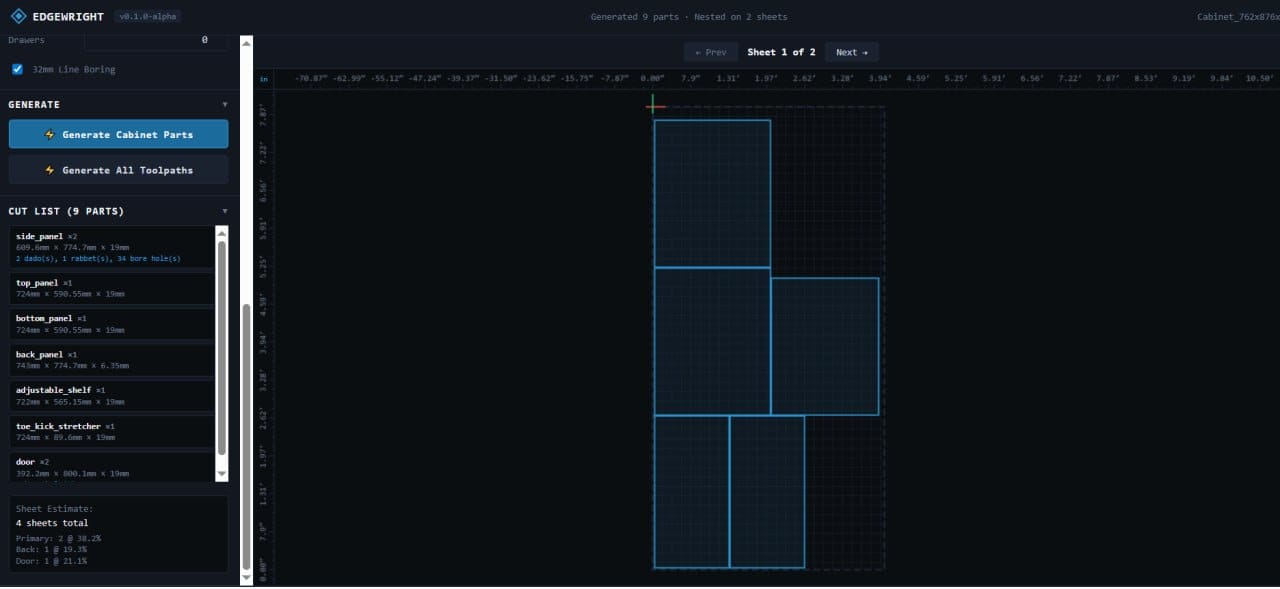
- Parametric cabinet builder
- Enter width/height/depth → all parts generated
- Dados, bore holes, and edgebanding allowances automated
- Nested cut lists ready in minutes
Sign Shops
Common pain point: Repetitive V-carving setup
AI solution:
- Upload customer logos in batch
- AI auto-traces all images
- Generates V-carve toolpaths for each
- Nests signs by material type
- One-click export
Furniture Makers
Common pain point: Complex joinery takes hours to program
AI solution:
- Dovetail joints: "12 drawers, 1/2-inch Baltic birch"
- Mortise & tenon: "Table frame, 2-inch tenons"
- AI generates precision joinery automatically
Educational Shops
Common pain point: Students need guidance, not just software
AI solution:
- Natural language interface (no training needed)
- AI explains why it chose certain settings
- Safe defaults prevent dangerous mistakes
- Students learn machining principles, not software menus
Limitations of Current AI CAM
AI isn't magic—here's what it can't do (yet):
Highly Custom Toolpaths
- Uncommon tool shapes (custom ground bits)
- Exotic materials (no training data)
- Non-standard operations (unique processes)
Solution: Manual override available for edge cases
Creative Design
AI generates toolpaths, not designs. You still need:
- CAD software (Inkscape, Fusion 360) for custom geometry
- Or parametric tools for standard shapes
Machine-Specific Quirks
If your CNC has unique mods (custom spindle, unusual kinematics), AI uses general settings.
Solution: Override defaults, AI learns your preferences
The Future of Automatic Toolpath Generation
Coming soon in AI CAM:
Computer Vision Integration
- Point phone camera at wood species → AI identifies and adjusts feeds
- Show AI a reference cut → it matches surface finish
Predictive Maintenance
- AI detects tool wear from feed rate variance
- Suggests bit changes before quality drops
Voice Control
- "Cut 10 more of those coasters"
- Hands-free operation in the shop
Real-Time Optimization
- AI monitors actual cut performance
- Adjusts future toolpaths based on results
Getting Started with Automatic Toolpaths
Step 1: Choose AI CAM software ( Step 2: Upload a simple design (coaster or sign) Step 3: Describe what you want in plain language Step 4: Review AI-generated toolpath Step 5: Export and cut
Most woodworkers generate their first automatic toolpath in under 5 minutes.
Cost-Benefit Analysis
Time savings for a typical shop:
- 10 projects/week
- Average 30 minutes CAM time saved per project
- = 5 hours/week saved
At $50/hour shop rate:
- Savings: $250/week = $1,000/month
EdgeWright Shop tier: $49/month
ROI: 2,000% (20× return)
Final Thoughts
Automatic toolpath generation isn't about removing skill from woodworking—it's about removing tedious technical busywork so you can focus on craft.
You're still the designer, the material expert, the finisher. AI just handles the math and parameter optimization.
Traditional machinists did feed rate calculations by hand. Modern machinists use calculators. AI CAM is the next step—a tool that makes you faster and more capable, not less skilled.
Ready to Automate Your Toolpaths?
- Upload your designs
- Generate automatic toolpaths in seconds
- Cut better parts in less time
- Focus on woodworking, not CAM software
Join woodworkers already saving hours per week with AI automation.
[ai/signup)
EdgeWright — Automatic toolpath generation for CNC routers. AI-powered CAM that understands woodworking.