EdgeWright for LongMill: AI-Powered CAM Software for Benchtop CNC Routers

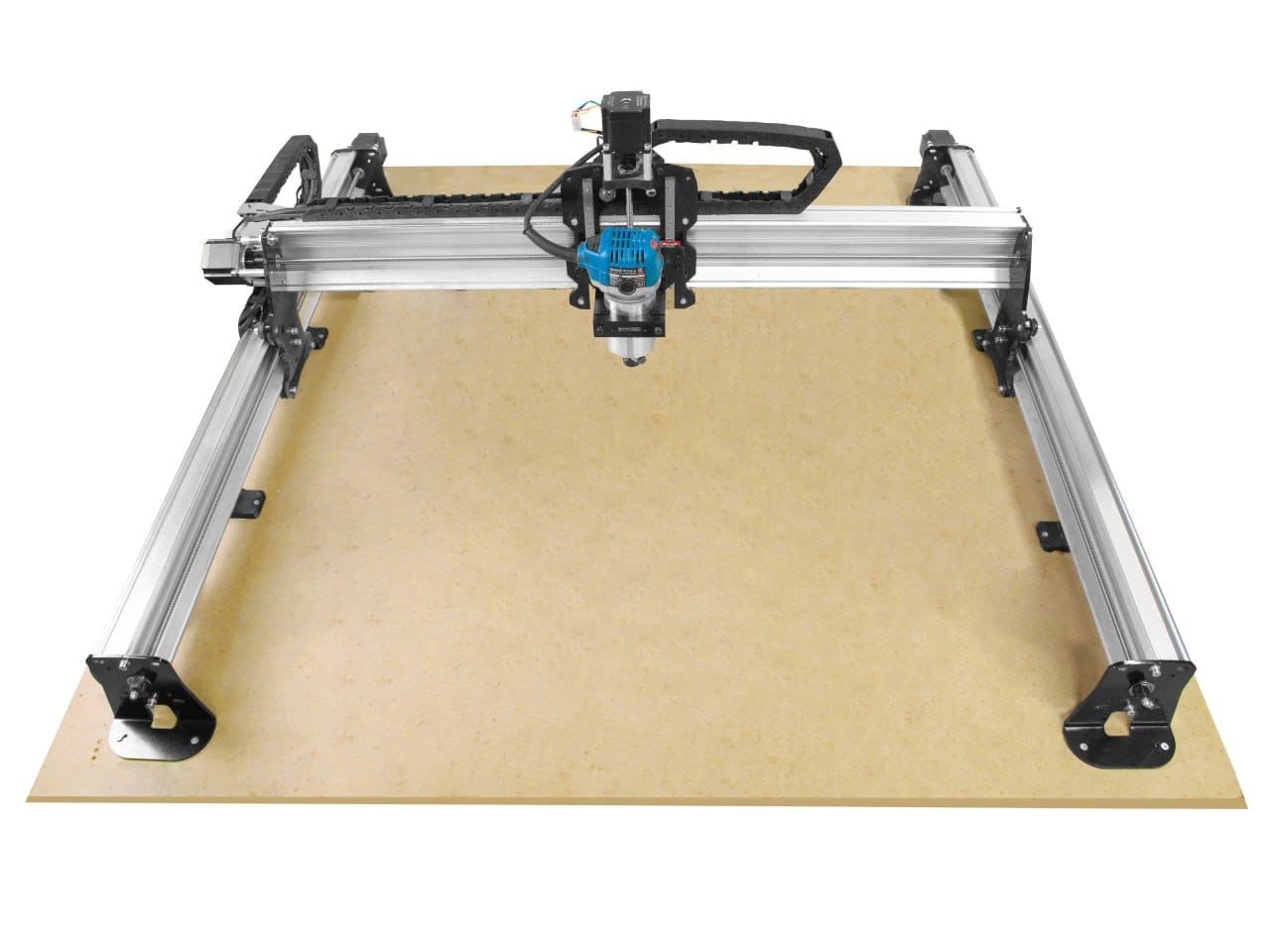
EdgeWright for LongMill: AI-Powered CAM Software for Benchtop CNC Routers
LongMill owners are makers, educators, and small shop operators who value smart engineering and affordability. You chose LongMill because it delivers solid performance without the inflated price tag. Now you need CAM software with the same philosophy.
gSender is a great G-code sender, but it doesn't create toolpaths. Inkscape + plugins work but feel clunky. VCarve costs $349+ and has a learning curve steeper than your Z-axis lead screw.
EdgeWright is AI-native CAM software built for LongMill users who want professional toolpaths without the professional price or complexity. Whether you're running an MK1, MK2, or the 48×30 version, EdgeWright understands your machine.
Why LongMill Users Love EdgeWright
1. AI Assistant That Speaks Maker
LongMill users are hands-on problem solvers. You built your machine from a kit—you can handle complexity when needed, but you prefer efficiency.
EdgeWright's AI assistant thinks like a maker:
Instead of clicking through CAM menus: "Profile cut this design with 3mm tabs, leave 0.5mm for hand sanding"
EdgeWright:
- Selects appropriate bit from your tool library
- Sets feeds/speeds for your material (hardwood, MDF, acrylic, etc.)
- Places tabs intelligently (corners and long edges)
- Adds finish allowance for sanding
- Exports GRBL G-code for gSender
What takes 15 minutes in traditional CAM takes 30 seconds with EdgeWright's AI.
2. Built for Benchtop Realities
LongMill's V-wheel and lead screw design balances cost and performance. EdgeWright optimizes toolpaths accordingly:
Conservative but Efficient:
- Gradual acceleration (prevents V-wheel skipping)
- Optimal corner speeds (maintains accuracy without slowing too much)
- Smart plunge rates (lead screws have limits)
- Chip load optimization (prevents bogging down your router)
VCarve and Fusion 360 generate toolpaths for industrial machines. EdgeWright generates toolpaths optimized for benchtop routers like LongMill.
3. Parametric Design for Makers
Building jigs, fixtures, or small-batch production parts? Stop redrawing the same geometry with different dimensions.
EdgeWright's parametric features:
Drawer boxes:
- Input: Width, depth, height, material thickness
- Output: All 6 parts with finger joints or dovetails, nested layout
Grid-based drilling:
- Input: Grid spacing, hole diameter, array size
- Output: Optimized drill path (minimizes rapids)
Slotted mounting plates:
- Input: Slot length, spacing, hole size
- Output: Complete toolpath with tabs
Inkscape can't do this. VCarve requires manual redraw. EdgeWright regenerates designs in seconds.
4. Nesting for Small Batch Production
LongMill beds:
- 12×30: Perfect for signs, drawer parts, small panels
- 30×30: Standard furniture components, cabinet doors
- 48×30: Large signs, table tops, nested sheet goods
EdgeWright's nesting engine maximizes your work area:
- Drag parts or auto-arrange
- Shows material utilization percentage
- Accounts for clamp positions (exclude zones)
- Grain direction awareness for plywood
- Generates cut order optimization
Save 10-15% on material costs vs manual layout.
5. Web-Based Fits Your Workflow
LongMill users run gSender on the shop computer, design on laptops, research on phones. Your CAM software should sync across all of them.
EdgeWright runs entirely in your browser:
- Design on laptop, send to shop PC
- Review projects on phone/tablet
- Cloud saves (never lose work to computer crashes)
- Share project links with clients or collaborators
- No software installations or updates
EdgeWright vs Traditional LongMill CAM Workflows
| Feature | Inkscape + Plugins | gSender (alone) | VCarve Desktop | EdgeWright | |---------|-------------------|-----------------|----------------|------------| | Price | Free (complex) | Free (no CAM) | $349 | $19-49/mo | | AI Toolpath Gen | ❌ | ❌ | ❌ | ✅ | | Parametric Design | ❌ | ❌ | ❌ | ✅ | | Auto Nesting | ❌ | ❌ | ❌ | ✅ | | 3D Preview | ❌ | Basic | ✅ | ✅ | | V-Carving | Manual | ❌ | ✅ | AI-powered | | Learning Curve | Steep | N/A | Steep | Gentle | | Web-Based | ❌ | ❌ | ❌ | ✅ | | LongMill-Optimized | Manual | N/A | Manual | ✅ Auto |
Perfect for LongMill Maker Projects
Educational Workshop Use
LongMill is popular in schools and makerspaces. EdgeWright makes teaching CNC easier:
Traditional CAM (VCarve):
- Teach students 20+ menu options
- Every mistake requires restarting toolpath creation
- Students forget steps between sessions
EdgeWright:
- Students describe what they want in plain language
- AI catches common mistakes ("That feed rate will break your bit")
- Students learn CNC concepts, not software menus
Educators: EdgeWright's AI reduces teaching time and increases successful first cuts.
Small Batch Production
Scenario: Etsy shop selling wooden coasters
Monthly volume: 200 coasters (4" diameter, various designs)
Traditional workflow:
- Manually nest 10-12 coasters per sheet
- Generate toolpaths per sheet
- Repeat for each design variant
EdgeWright workflow:
- Upload all designs
- Auto-nest across sheets
- Single-click toolpath generation
- Export G-code
Time saved: 3-4 hours/month = $100-200 at maker labor rates
Sign Making
LongMill's 48×30 bed is perfect for sign production. EdgeWright streamlines it:
Upload logo → AI V-carve → Generate tabs → Export G-code
Total time: Under 2 minutes from design to cutting
Jigs & Fixtures
Makers constantly need custom jigs. EdgeWright's parametric tools:
- Adjustable dado jigs (variable spacing)
- Drill templates (custom hole patterns)
- Corner radius jigs (parametric radii)
- Crosscut sleds (sized to your table saw)
Change a dimension, regenerate toolpath, cut new version. All in under 5 minutes.
LongMill-Specific Optimizations
EdgeWright understands LongMill's design:
V-Wheel Kinematics
- Conservative corner speeds (prevents wheel slip)
- Gradual acceleration curves (smooth motion)
- Backlash awareness (proper approach directions)
Lead Screw Z-Axis
- Optimized plunge rates (ACME lead screw limits)
- Safe retract heights (clearance for chips)
- Gentle ramp entries (prevents plunge marks)
Work Area Sizing
- 12×30, 30×30, 48×30 nesting templates built-in
- Wasteboard exclusion zones (avoid clamps)
- Material thickness compensation
Router Compatibility
EdgeWright includes feeds/speeds for common LongMill router choices:
- Makita RT0701C
- DeWalt DWP611
- Bosch Colt
- Milwaukee 5625-20
gSender Integration
- Exports GRBL G-code (gSender native format)
- Compatible with gSender's surfacing, probing, and macros
- Safe Z-heights match gSender defaults
What LongMill Makers Are Saying
"I was using Inkscape with JTech extensions—it worked but felt like duct tape and baling wire. EdgeWright is clean, fast, and the AI actually helps me learn better toolpath strategies." — Mike L., LongMill 30×30, makerspace instructor
"The parametric drawer builder alone is worth it. I build 10-15 custom drawer boxes a month. EdgeWright cut my CAD time from 30 minutes per box to 2 minutes." — Sarah K., LongMill 48×30, custom furniture
"I'm not a CAD person—I'm a woodworker who happens to have a CNC. EdgeWright lets me focus on design and let the AI handle the technical stuff." — Tom R., LongMill MK2, sign shop
Common Questions
Does it work with gSender?
Yes! EdgeWright exports standard GRBL G-code that gSender loads natively. Design in EdgeWright, send in gSender.
Can I use my existing tool library?
Import tools via CSV or add manually. EdgeWright supports standard router bits (straight, ball nose, V-bits, dovetail, etc.).
What about surfacing my wasteboard?
Use gSender's built-in surfacing tool—it's perfect for that. EdgeWright focuses on making your actual parts.
Does EdgeWright replace gSender?
No—they're complementary. EdgeWright creates toolpaths (CAM), gSender sends them to your machine (G-code sender). Use both together.
What file formats can I import?
DXF, SVG, STL (for 3D carving). Export from Inkscape, Illustrator, Fusion 360, FreeCAD, etc.
Will it work offline?
Currently web-based (requires internet). Offline mode is on the roadmap based on user feedback.
Getting Started with EdgeWright on Your LongMill
**1. Sign up for *2. Upload a DXF or SVG* (or try sample projects) 3. Describe your toolpath ("Profile cut with tabs") 4. Download G-code (GRBL format) 5. Load into gSender (run on your LongMill)
Most LongMill users cut their first part within 15 minutes of signup.
Simple, Affordable Pricing
EdgeWright offers affordable subscription pricing with all features included:
Key Features:
- DXF Import: Import vector files for profile, pocket, and drill operations
- Profile, Pocket & Drill Operations: Core CNC toolpath generation
- V-Carve Toolpaths: Advanced decorative carving and engraving
- Cabinet Designer: Parametric cabinet generator with width/height/depth inputs, frameless or face frame styles, shelves, doors, drawers with Blum undermount patterns, dado joinery
- Smart Nesting: FFDH shelf-pack algorithm with 90° rotation, multi-sheet output with sheet-by-sheet navigation
- Image Carve: Upload any image (PNG/JPG/BMP/TIFF), drag-to-crop tool, export as STL (3D relief mesh) or DXF iso-contours, generate relief G-code with depth heatmap preview
- Toolpath Preview: Visual preview of toolpaths before cutting
- Universal Post-Processors: UCCNC, GRBL, Mach3, Mach4, LinuxCNC compatibility
- Project Persistence: Automatic save to database, list/load/delete projects
- AI Assistant: Natural language machining recommendations and cabinet generation
No upfront costs. No long-term commitments.
No upfront costs. No long-term commitments.
No upfront costs. No long-term commitments.
Ready to try EdgeWright?
Why EdgeWright Exists
Sienci Labs built LongMill to make CNC accessible—great engineering at a fair price. We built EdgeWright with the same philosophy for CAM software.
Inkscape + plugins work but feel cobbled together. VCarve is powerful but expensive and Windows-only. Fusion 360 CAM is overkill—designed for metal mills, not router workflows.
EdgeWright fills the gap: Router-focused CAM with AI assistance, modern web interface, and features makers actually need (parametric tools, auto-nesting, educational support).
Ready to Supercharge Your LongMill?
- Import your first design in 30 seconds
- Generate AI-powered toolpaths
- Export GRBL G-code for gSender
- Cut better parts faster
Join LongMill makers already using EdgeWright.
[ai/signup)
EdgeWright — AI-powered CAM software for benchtop CNC routers. Built for LongMill, Shapeoko, X-Carve, and Onefinity users who want professional results without professional complexity.