EdgeWright for UCCNC Users: AI-Powered CAM Software for Precision CNC Control

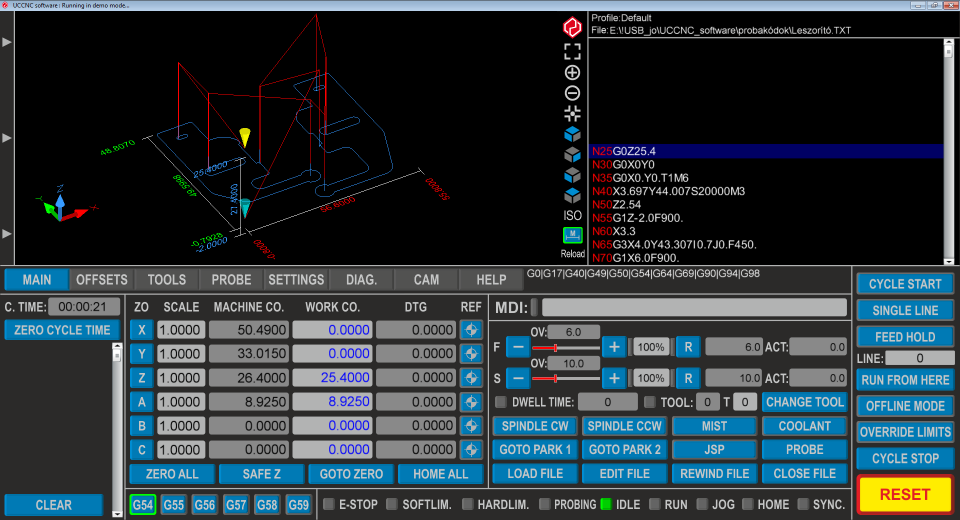
EdgeWright for UCCNC Users: AI-Powered CAM Software for Precision CNC Control
You chose UCCNC because you wanted industrial-grade motion control without the industrial price tag. You got real-time Ethernet communication, microsecond-level step pulse accuracy, and the ability to tune every parameter of your machine's behavior. Your controller is capable of incredible precision.
But your CAM software hasn't caught up.
EdgeWright is AI-native CAM software built for UCCNC's precision capabilities. Whether you're running a custom-built router, retrofitted mill, or commercial UCCNC-based machine, EdgeWright generates toolpaths that leverage your controller's accuracy and reliability.
Why UCCNC Users Are Choosing EdgeWright
1. AI Assistant That Speaks CNC
UCCNC users are serious operators. You understand feeds, speeds, tool engagement, and chipload. But even experienced machinists waste time clicking through CAM menus.
EdgeWright's AI bridges the gap between intent and execution:
Instead of:
- Import DXF
- Select geometry
- Create toolpath wizard
- Set tool parameters (diameter, flutes, material)
- Configure feeds and speeds
- Set stepdown and stepover
- Define lead-in/lead-out
- Generate toolpath
- Verify in simulator
- Export G-code
You tell EdgeWright: "Profile cut this part with a 1/4" endmill, 0.100" stepdown, leave 0.010" for finish pass"
EdgeWright's AI:
- Selects appropriate tool from your library
- Calculates optimal feeds based on material and tool geometry
- Generates roughing toolpath with specified stepdown
- Creates finish pass with appropriate speeds for surface quality
- Exports UCCNC-optimized G-code with proper formatting
What takes 15 minutes of setup takes one sentence.
2. UCCNC-Optimized Post-Processor
UCCNC's motion planning is sophisticated. It deserves G-code that takes advantage of it.
EdgeWright's UCCNC post-processor generates code that:
- Uses precise coordinate formatting (4-5 decimal places for sub-micron accuracy)
- Implements proper arc interpolation (G2/G3) for smooth curves
- Includes safe Z-height positioning for tool changes
- Generates optimized rapid moves (G0) between cuts
- Properly formats spindle control (M3/M4/M5) with S-word RPM commands
- Includes feed rate optimization for different operation types
- Supports work coordinate systems (G54-G59) for multi-fixture setups
Unlike generic G-code that treats all controllers the same, EdgeWright's UCCNC output is tuned for your controller's capabilities.
3. Parametric Cabinet Engine for Production Shops
UCCNC users often run professional shops. Time is money, and CAD/CAM time is expensive overhead.
Traditional cabinet workflow:
- Customer provides specifications
- Hours of CAD work drawing all parts
- Manual toolpath creation for each component
- Tedious nesting on sheet materials
- G-code generation and verification
EdgeWright's parametric cabinet builder automates 90% of this:
Enter project parameters:
- Cabinet dimensions (width, height, depth)
- Construction style (frameless, face frame)
- Joinery type (dado, rabbet, pocket screws)
- Hardware specifications (Blum undermount drawer patterns, European hinges)
- Material thickness and type
EdgeWright generates:
- Complete cut list with all panels
- Automated dado joinery placement
- Hardware boring patterns (32mm European system or custom)
- Intelligent nesting across multiple sheets
- Optimized toolpath order (minimize tool changes)
- UCCNC-ready G-code for all operations
A 2-hour CAD/CAM job becomes a 5-minute parametric setup. Your shop rate just jumped $300/hour.
4. Smart Nesting with Material Optimization
UCCNC machines often have large work envelopes—48×96 inches or more. Efficient nesting is critical for material costs and production throughput.
EdgeWright's FFDH nesting algorithm:
- Automatically arranges parts for maximum sheet utilization
- Supports 90-degree rotation for optimal fit
- Accounts for grain direction on plywood
- Manages multi-sheet layouts with sheet-by-sheet navigation
- Shows real-time utilization percentages
- Generates optimized cut order (reduces rapids, minimizes tool changes)
Manual nesting in traditional CAM:
- Drag parts around by hand
- Guess at spacing and rotation
- Hope for good efficiency
- Result: 70-80% material utilization
EdgeWright automatic nesting:
- 3-second computation
- Optimal placement algorithm
- Result: 85-95% material utilization
On a $100 sheet of plywood, that's $15-25 in savings. Across 100 sheets per month, that's $1,500-2,500 recovered material cost.
5. Advanced V-Carving with Precision Control
UCCNC's motion smoothness makes it ideal for detailed V-carving work. EdgeWright leverages this.
Upload a logo or design, EdgeWright:
- Auto-traces vectors from images
- Calculates optimal V-bit engagement angles
- Generates variable-depth toolpaths (image-based depth mapping)
- Implements smooth feed rate control for varying depths
- Adds finish passes for crisp edge definition
- Optimizes plunge rates for different materials
UCCNC's microsecond-level timing + EdgeWright's AI toolpath generation = gallery-quality carved details.
6. Image Carve: From Photo to Relief
EdgeWright's Image Carve feature transforms any image into 3D relief toolpaths:
Workflow:
- Upload image (PNG, JPG, BMP, TIFF)
- Use drag-to-crop tool to select carving area
- Preview depth heatmap (brightness = depth)
- Export options:
- STL format for 3D mesh (import to other CAM tools)
- DXF iso-contours for layered depth cutting
- Direct G-code generation with adaptive toolpath strategies
UCCNC's precision positioning ensures accurate reproduction of fine details in relief carving.
7. Web-Based: Modern Interface for Modern Control
UCCNC runs on Windows PCs, but your workflow doesn't have to be desktop-locked.
EdgeWright runs entirely in your browser:
- Design toolpaths on your laptop
- Review projects on tablet in the shop
- Cloud project storage (SQLite database with automatic saves)
- Share project links with clients for approval
- Access from any device (Windows, Mac, Linux, iPad)
- No software installation or version conflicts
Generate toolpaths anywhere, download G-code, load to your UCCNC machine.
EdgeWright vs Traditional CAM for UCCNC
| Feature | Traditional CAM | EdgeWright |
|---|---|---|
| AI Assistant | ❌ Manual menu navigation | ✅ Natural language commands |
| UCCNC Post-Processor | Generic or manual editing | ✅ Optimized for UCCNC |
| Parametric Cabinets | ❌ Manual CAD required | ✅ Automated generation |
| Smart Nesting | ❌ Manual layout | ✅ AI-optimized algorithm |
| Image Carve | ❌ Requires separate software | ✅ Built-in with STL/DXF export |
| 3D Toolpath Preview | Sometimes | ✅ Always |
| Web-Based Access | ❌ Desktop-only | ✅ Browser-based |
| Learning Curve | Steep (weeks of training) | Gentle (AI-guided) |
| Project Persistence | File-based (prone to loss) | ✅ Cloud database |
| Tool Library Management | Per-file or global config | ✅ Synced across all projects |
Perfect for UCCNC Production Workflows
High-Precision Parts Manufacturing
UCCNC's real-time Ethernet control delivers positioning accuracy to 0.0001 inches. EdgeWright generates toolpaths to match:
Scenario: Precision fixture plates with dowel pin holes
Traditional CAM:
- Manually create drill cycle for each hole
- Set precise X/Y coordinates by hand
- Verify positioning math multiple times
- Hope for no typos in coordinate entry
EdgeWright:
- Import DXF with hole locations
- Tell AI: "Drill all 1/4" holes to 0.5" depth"
- EdgeWright generates optimized drill cycle with proper peck drilling
- UCCNC-formatted G-code with accurate positioning
- Result: Perfect hole placement, first time
Cabinet Shop Production
Scenario: 20 kitchen cabinets with mixed sizes
Traditional workflow:
- Draw each cabinet manually (8-12 hours)
- Create toolpaths for all parts (4-6 hours)
- Manually nest parts on plywood sheets (2-3 hours)
- Generate G-code for each sheet
- Total CAD/CAM time: 14-21 hours
EdgeWright workflow:
- Enter dimensions for each cabinet (30 minutes)
- Parametric engine generates all parts with dados and hardware patterns
- Smart nesting across sheets with utilization optimization
- Export UCCNC G-code ready to cut
- Total CAD/CAM time: 1 hour
Time saved: 13-20 hours = $1,300-2,000 at $100/hour shop rate
Sign Production & V-Carving
Scenario: Custom wooden signs with logo and text
EdgeWright advantages:
- Upload logo image, AI traces vectors automatically
- Generate V-carve toolpaths with depth variation
- UCCNC's smooth motion control ensures clean carved edges
- Preview toolpath in 3D before cutting
- Export optimized G-code with proper feed rate control
UCCNC's motion planning + EdgeWright's AI toolpaths = professional carved signs without trial-and-error test cuts.
Inlay & Detail Work
Precision inlay requires perfectly matched male and female parts. UCCNC's accuracy makes this possible, EdgeWright makes it easy:
EdgeWright inlay workflow:
- Design inlay geometry
- AI generates mating toolpaths with offset compensation
- Accounts for tool deflection and material properties
- UCCNC executes with repeatable micron-level accuracy
- Result: Press-fit inlays without hand-fitting
UCCNC-Specific Optimizations
EdgeWright recognizes UCCNC's strengths and generates toolpaths accordingly:
Ethernet Real-Time Control
- High-speed data transfer: EdgeWright's toolpaths can include dense point data for complex curves without overwhelming the controller
- Microsecond timing: Smooth acceleration/deceleration handling in generated G-code
- No buffering issues: Properly formatted commands for UCCNC's parser
Motion Planning Intelligence
- Look-ahead compatible: G-code structured for UCCNC's trajectory planning
- Corner speed optimization: Arc commands (G2/G3) used where appropriate for smooth motion
- Feed rate management: Proper F-word placement for UCCNC's modal G-code interpretation
Multi-Axis Support
- Work coordinate systems: G54-G59 support for multiple fixture setups
- Tool length offsets: Proper G43 implementation for tool changes
- Probe cycle compatibility: G-code formatted for UCCNC's probing functions
Industrial Features
- Macro support: Comments and structure for UCCNC macro integration
- Error handling: Safe positioning and proper program structure
- Tool change protocols: M6 with proper sequence for ATC or manual changes
Common Questions from UCCNC Users
Does EdgeWright output work with my UCCNC configuration?
Yes. EdgeWright generates standard G-code compatible with UCCNC's interpreter. Whether you're running a router, mill, plasma cutter, or laser, the G-code format is correct. You may need to adjust tool change macros based on your specific machine configuration (ATC vs manual).
Can I import tool libraries from UCCNC?
EdgeWright maintains its own tool library that syncs across all your projects. You can manually enter your UCCNC tools (diameter, flutes, material, coating) or import via CSV. Once entered, tools are available in all future projects.
What about custom post-processor modifications?
EdgeWright's UCCNC post-processor is optimized for standard UCCNC configurations. If you have custom requirements (special machine commands, unique sequencing), contact support for post-processor customization.
Does it support 4th axis or rotary?
Current focus is 3-axis milling and routing. Rotary axis support is on the development roadmap. If you need 4th axis toolpaths, let us know—feature priority is driven by user demand.
Can I use work offsets (G54-G59)?
Yes. EdgeWright supports work coordinate system selection in the post-processor. You can specify which offset to use for multi-fixture setups.
How does it handle tool changes?
EdgeWright inserts M6 tool change commands with proper sequencing (spindle stop, Z-axis retract, tool change, spindle restart). You'll need to configure your UCCNC macros for your specific tool change procedure (manual or automatic).
Getting Started with EdgeWright on Your UCCNC Machine
1. Sign Up: Visit edgewright.ai
2. Import or Design: Upload DXF/SVG or use Cabinet Designer
3. AI-Guided Setup: Tell EdgeWright what you need or use interactive tool selection
4. Preview Toolpaths: 3D visualization of cut paths
5. Export UCCNC G-Code: Download optimized code ready for your controller
6. Load & Cut: Transfer G-code to UCCNC machine and run
Most users generate production-ready toolpaths within 20 minutes of first login.
Key EdgeWright Features for UCCNC Users
DXF Import & Vector Operations:
- Profile cuts (outside/inside/on-line)
- Pocket clearing with island detection
- Drill cycles with peck drilling support
V-Carve Toolpaths:
- AI-powered depth calculation
- Variable-depth carving from images
- Optimal V-bit angle selection
Cabinet Designer:
- Parametric width/height/depth inputs
- Frameless or face frame styles
- Automated dado joinery
- Blum undermount drawer patterns
- Custom shelf and door configurations
Smart Nesting:
- FFDH shelf-pack algorithm
- 90-degree rotation optimization
- Multi-sheet layout with sheet navigation
- Real-time utilization feedback
Image Carve:
- Drag-to-crop image selection
- Export as STL (3D relief mesh) or DXF (iso-contours)
- Depth heatmap preview
- Direct relief G-code generation
Toolpath Preview:
- 3D visualization of tool paths
- Cut simulation before machining
- Verify tool engagement and clearances
Universal Post-Processors:
- UCCNC (optimized)
- GRBL, Mach3, Mach4, LinuxCNC support
Project Persistence:
- Automatic cloud save (SQLite database)
- Project list, load, and delete management
- Never lose work due to crashes
AI Assistant:
- Natural language toolpath generation
- Machining recommendations
- Automated cabinet design from descriptions
Why UCCNC Users Need EdgeWright
You chose UCCNC because you wanted control, precision, and reliability. You deserve CAM software with the same philosophy.
Traditional CAM:
- Complex menu-driven interfaces
- Steep learning curves (weeks of training)
- Generic G-code output (not optimized for your controller)
- Desktop-locked (no mobile access)
- Manual nesting and layout (time-consuming and inefficient)
EdgeWright:
- AI-guided natural language interface
- Gentle learning curve (productive in minutes)
- UCCNC-optimized post-processor
- Web-based (access from anywhere)
- Automated nesting and parametric design
You invested in precision control. EdgeWright ensures your CAM workflow matches your machine's capabilities.
Ready to Optimize Your UCCNC Workflow?
Visit edgewright.ai to get started:
- Generate your first toolpath with AI assistance
- See UCCNC-optimized G-code output
- Try parametric cabinet generation
- Experience automatic smart nesting
- Export production-ready code for your machine
EdgeWright: AI-powered CAM software built for precision CNC control.
EdgeWright — Modern CAM software for UCCNC, GRBL, Mach3, Mach4, and LinuxCNC users who demand precision, efficiency, and intelligent automation in their CNC workflows.